

API Reference
Wave Business APIs provide a programmatic means to work with your Wave business account. By using these REST APIs you can receive payments, send money to your clients, check the balance on your wallet and perform automated reconciliation.
To use these APIs, you need a Wave Business Account.
Base URL
All the endpoint paths referenced in the API document are relative to a base URL, https://api.wave.com.
Authentication
Authenticating to the API is done via API keys. These keys are bound to a single business wallet and can only interact with it.
If you need to interact with more than one wallet in your network, then you will have to obtain one key per wallet.
Each request must be sent over HTTPS and contain an authorization header specifying the bearer scheme with the api key:
Authorization: Bearer wave_sn_prod_YhUNb9d...i4bA6
Note that the actual key is much longer but for documentation purposes most of the characters have been replaced by an ellipses.
Obtaining your API key
You can manage API keys in the developer's section in the Wave Business Portal. You can create, view, and revoke keys, and define which specific APIs each key has access to.
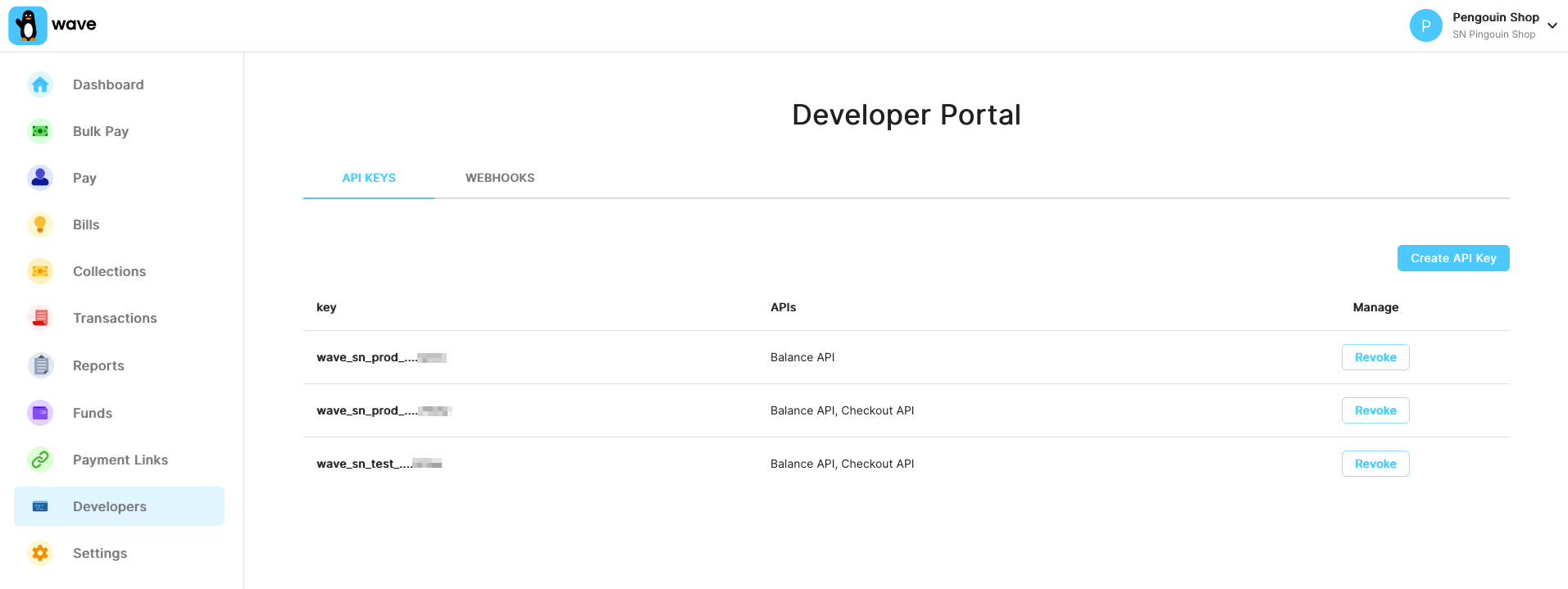
When you create a new API key, you will only see the full key once. Make sure you copy it without missing any characters, since it will be masked afterwards for security reasons.
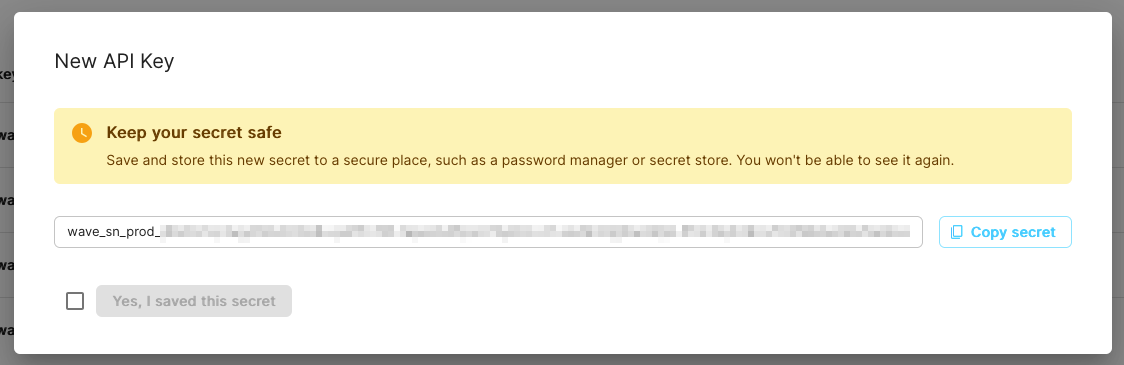
Wave doesn't know your full key, but if you contact API support we can identify them by the last 4 letters that you see displayed in the business portal.
Request signing
Request signing allows you to prove the integrity of your API requests. When enabled, each request must include a Wave-Signature header containing a timestamp and an HMAC-SHA256 signature of the request body.
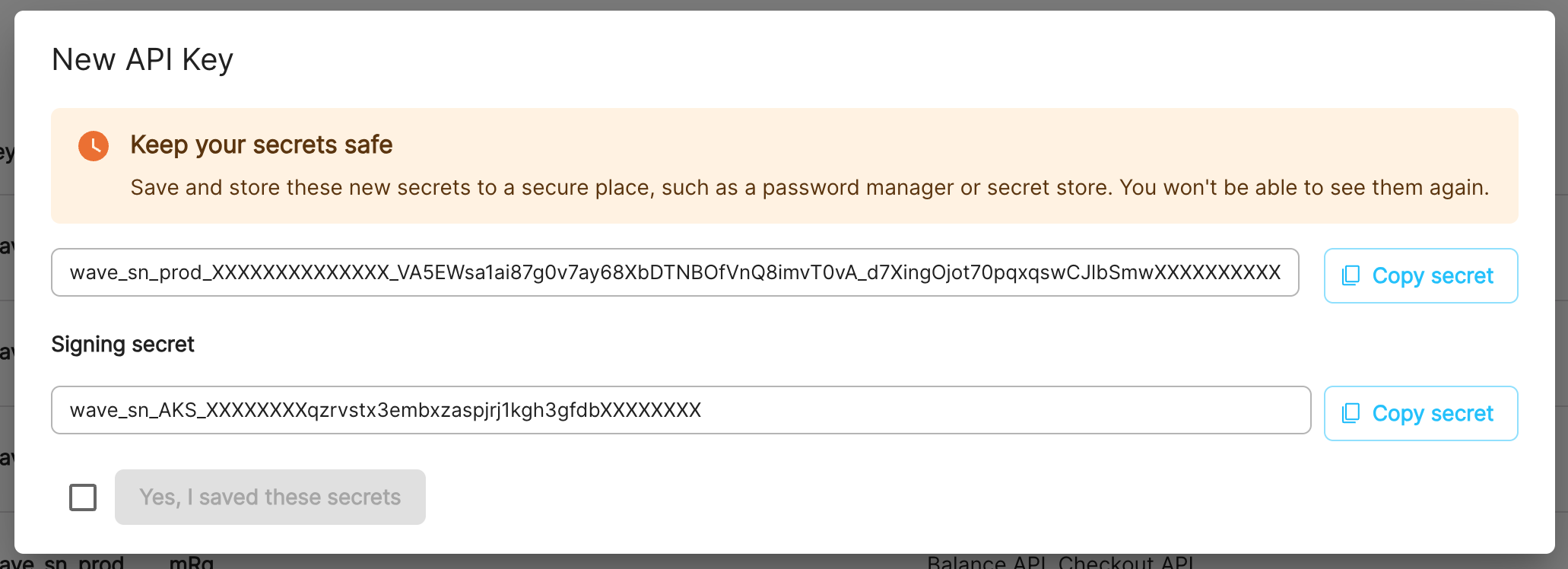
Request signing is optional. When you create an API key with request signing enabled, a signing secret is generated and shown to you once. After that, all requests made with that API key must include a valid Wave-Signature header.
Enabling request signing
When creating a new API key in the Wave Business Portal, select the option to enable request signing. You will receive a signing secret in the format:
wave_sn_AKS_XXXXXXXXXXXXXXXXXXXXXXXXXXXXXXXXXXXXXXXX
Constructing the signature
To sign a request, you must:
- Get the current time as a Unix timestamp (integer seconds).
- Construct the payload by concatenating the timestamp with the raw request body (i.e.
timestamp + body). - Compute the HMAC-SHA256 of the payload using your signing secret as the key.
- Set the
Wave-Signatureheader tot={timestamp},v1={signature}.
Example
Wave-Signatureheader:
Wave-Signature: t=1639081943,v1=942119aedf9fa377844cf010785fe14ef8478c72af0b73d62ea3941335b526a8
The Wave-Signature header consists of a timestamp prefixed by t= and a signature prefixed by v1=, separated by a comma.
Signature generation examples
# Generate the signature and make a signed request
TIMESTAMP=$(date +%s)
BODY='{"amount": "1000", "currency": "XOF"}'
SIGNING_SECRET="wave_sn_AKS_XXXXXXXXXXXXXXXXXXXXXXXXXXXXXXXXXXXXXXXX"

SIGNATURE=$(printf '%s%s' "$TIMESTAMP" "$BODY" \
  | openssl dgst -sha256 -hmac "$SIGNING_SECRET" \
  | sed 's/^.* //')

curl -X POST \
  -H "Authorization: Bearer wave_sn_prod_YhUNb9d...i4bA6" \
  -H "Wave-Signature: t=${TIMESTAMP},v1=${SIGNATURE}" \
  -H "Content-Type: application/json" \
  -d "$BODY" \
  https://api.wave.com/v1/checkout/sessions
<?php
$api_key = "wave_sn_prod_YhUNb9d...i4bA6";
$signing_secret = "wave_sn_AKS_XXXXXXXXXXXXXXXXXXXXXXXXXXXXXXXXXXXXXXXX";

$body = json_encode([
    "amount" => "1000",
    "currency" => "XOF",
]);

$timestamp = time();
$signature = hash_hmac("sha256", $timestamp . $body, $signing_secret);
$wave_signature = "t={$timestamp},v1={$signature}";

$ch = curl_init();
curl_setopt($ch, CURLOPT_URL, "https://api.wave.com/v1/checkout/sessions");
curl_setopt($ch, CURLOPT_RETURNTRANSFER, 1);
curl_setopt($ch, CURLOPT_POST, 1);
curl_setopt($ch, CURLOPT_POSTFIELDS, $body);
curl_setopt($ch, CURLOPT_HTTPHEADER, [
    "Authorization: Bearer {$api_key}",
    "Wave-Signature: {$wave_signature}",
    "Content-Type: application/json",
]);

$result = curl_exec($ch);
curl_close($ch);
?>
const crypto = require('crypto');
const axios = require('axios');

const apiKey = "wave_sn_prod_YhUNb9d...i4bA6";
const signingSecret = "wave_sn_AKS_XXXXXXXXXXXXXXXXXXXXXXXXXXXXXXXXXXXXXXXX";

const body = JSON.stringify({
  amount: "1000",
  currency: "XOF",
});

const timestamp = Math.floor(Date.now() / 1000);
const payload = timestamp + body;
const signature = crypto.createHmac('sha256', signingSecret).update(payload).digest('hex');
const waveSignature = `t=${timestamp},v1=${signature}`;

axios.post("https://api.wave.com/v1/checkout/sessions", body, {
  headers: {
    "Authorization": `Bearer ${apiKey}`,
    "Wave-Signature": waveSignature,
    "Content-Type": "application/json",
  },
});
import java.nio.charset.StandardCharsets;
import javax.crypto.Mac;
import javax.crypto.spec.SecretKeySpec;

public class WaveRequestSigner {
    private static final byte[] HEX_ARRAY = "0123456789abcdef".getBytes(StandardCharsets.US_ASCII);

    public static String sign(String body, String signingSecret) throws Exception {
        long timestamp = System.currentTimeMillis() / 1000;
        String payload = timestamp + body;

        Mac sha256Hmac = Mac.getInstance("HmacSHA256");
        SecretKeySpec secretKey = new SecretKeySpec(
            signingSecret.getBytes(StandardCharsets.UTF_8), "HmacSHA256");
        sha256Hmac.init(secretKey);
        byte[] hash = sha256Hmac.doFinal(payload.getBytes(StandardCharsets.UTF_8));

        String signature = bytesToHex(hash);
        return "t=" + timestamp + ",v1=" + signature;
    }

    private static String bytesToHex(byte[] bytes) {
        byte[] hexChars = new byte[bytes.length * 2];
        for (int j = 0; j < bytes.length; j++) {
            int v = bytes[j] & 0xFF;
            hexChars[j * 2] = HEX_ARRAY[v >>> 4];
            hexChars[j * 2 + 1] = HEX_ARRAY[v & 0x0F];
        }
        return new String(hexChars, StandardCharsets.UTF_8);
    }
}
Timestamp validation
Wave validates that the signature timestamp is recent to prevent replay attacks. Requests are rejected if:
- The timestamp is more than 5 minutes in the past.
- The timestamp is more than 30 seconds in the future (to allow for minor clock skew).
Ensure your server's clock is reasonably synchronized.
Signed request for GET endpoints
For GET requests that have no body, use an empty string as the body when constructing the signature payload. That is, the payload is just the timestamp string.
Error codes
In the authentication phase, one of the following errors can cause your request to return early:
| Status | Code | Descriptions |
|---|---|---|
| 401 | missing-auth-header |
Your request should include an HTTP auth header. |
| 401 | invalid-auth |
Your HTTP auth header can't be processed. |
| 401 | api-key-not-provided |
Your request should include an API key. |
| 401 | no-matching-api-key |
The key you provided doesn't exist in our system. |
| 401 | api-key-revoked |
Your API key has been revoked. |
| 401 | missing-signature |
Your API key has request signing enabled but the Wave-Signature header is missing. |
| 401 | invalid-signature-format |
The Wave-Signature header is malformed. It must be in the format t={timestamp},v1={signature}. |
| 401 | invalid-signature |
The signature does not match. Verify you are using the correct signing secret and signing the raw request body. |
| 401 | invalid-signature-timestamp |
The timestamp in the signature is not a valid number. |
| 401 | expired-signature-timestamp |
The signature timestamp is too far from the current time. |
| 403 | invalid-wallet |
Your wallet can't be used in this particular API. |
| 403 | disabled-wallet |
Your wallet has been temporarily disabled. You should still be able to use the endpoint to check your balance. |
Leaked API key remediation
If you suspect or have confirmed that a Wave Business API key has been exposed — for example, committed to a public repository, accidentally shared, or otherwise compromised — this page describes how to rotate it and what Wave will do in response.
What's at risk
Wave Business API keys authenticate requests to the Business APIs. Anyone who obtains a leaked key can call any endpoint the key has permissions for, including initiating transfers up to the available balance. Treat any exposure as urgent and rotate the compromised key immediately.
Rotate
- Sign in to the Wave Business Portal.
- In the developer section, generate a new API key with the same roles as the leaked one.
- Deploy the new key to your integration.
- Once the new key is in use, revoke the old one from the Business Portal.
See Obtaining your API key for more details on creating and managing keys.
If you can't access the Business Portal or aren't sure which API key has been compromised, contact your Wave account manager and we'll help.
What Wave does
When we learn of a leak, an account manager reaches out to the partner who owns the key with the leak details and rotation instructions. If we believe the leak is being actively exploited or we can't reach the partner, Wave may revoke the key directly to contain the exposure.
Preventing future leaks
- Use environment variables or a secrets manager — never commit keys to source control.
- Enable request signing on your API keys, so a leaked key alone can't be used to make requests.
- Configure IP whitelisting on your API keys so even a leaked key can't be used from an attacker's network.
IP Whitelisting
IP whitelisting restricts API access to requests originating from specific, pre-approved IP addresses. Even if an API key is compromised, requests from unrecognized IPs are rejected; adding a second layer of defense on top of key-based authentication.
This helps meet financial-services compliance requirements and gives internal teams tighter control over which servers can reach Wave's APIs.
How It Works
IP whitelisting works alongside API key authentication. When a request hits the API, three checks happen in order:
- API key validation: Is the API key valid?
- Enforcement check: Is IP whitelisting enabled for this wallet?
- IP validation: Does the request's source IP match an entry in the whitelist?
All three must pass for the request to succeed.
Configuration
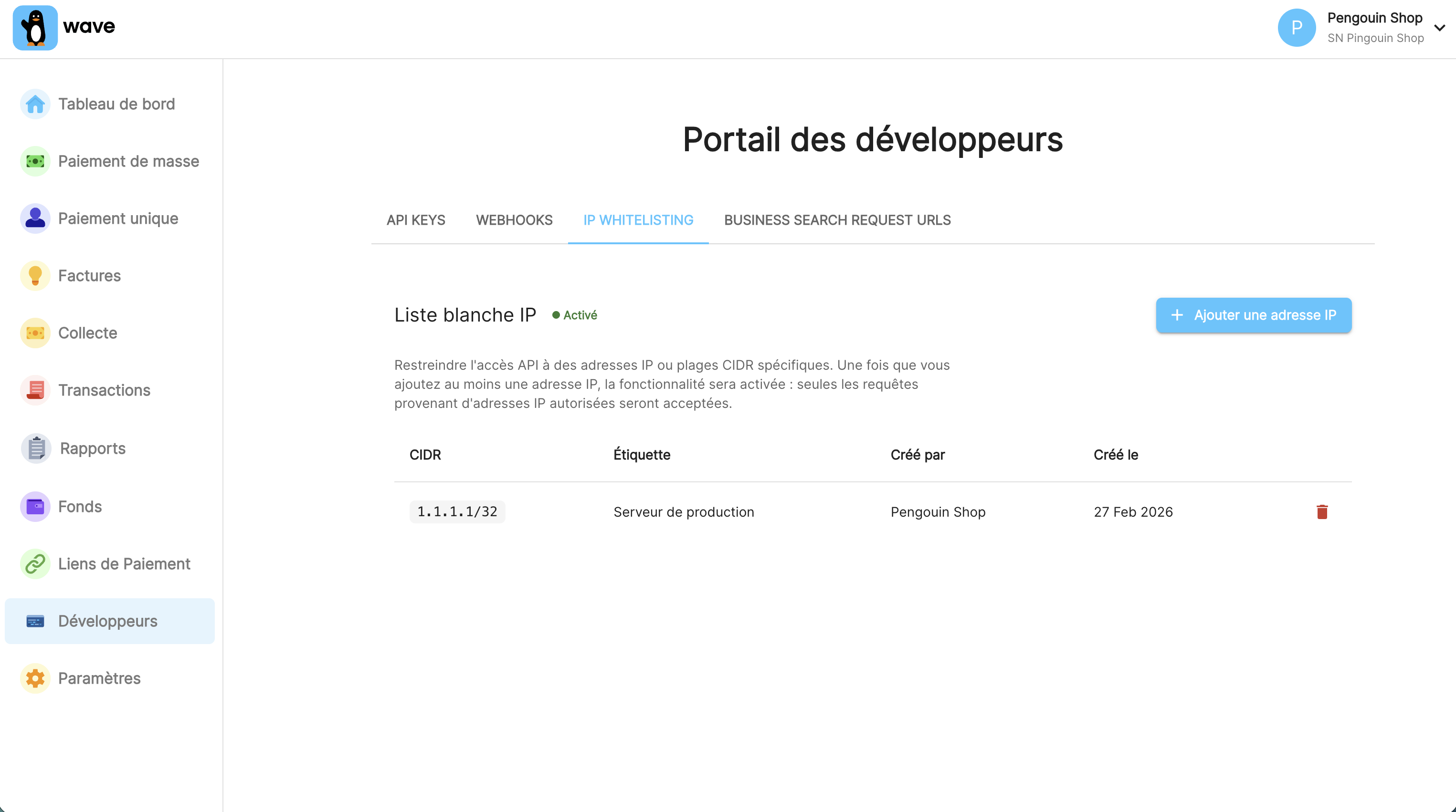
IP whitelisting is managed in the Wave Business Portal under the Developer section.
Supported Formats
You can whitelist a single IP or a CIDR range:
| Format | Example | Notes |
|---|---|---|
| Single IP | 203.0.113.45 |
Stored as /32 (IPv4) or /128 (IPv6) |
| CIDR range | 203.0.113.0/24 |
Whitelists an entire subnet |
Validation Rules
The system enforces the following constraints:
| Rule | Detail |
|---|---|
| Minimum prefix length | /8 for IPv4 (~16M addresses), /48 for IPv6 (standard site allocation) |
| No private/reserved IPs | Private, reserved, loopback and link-local addresses are rejected |
| No overlapping ranges | New entries must not overlap with existing whitelist entries |
| Normalization | All entries are normalized to strict CIDR notation |
Managing Entries
The portal lets you view all active whitelist entries, including labels and who created each one (created_by). Each entry should have a clear label describing the server, environment or purpose. This makes future audits much easier.
Error Handling
Requests from non-whitelisted IPs receive a 403 response:
| Status | Code | Description |
|---|---|---|
| 403 | ip-not-allowed |
The request originated from an IP address not on the allowlist |
{
  "error": {
    "code": "ip-not-allowed",
    "message": "Request from IP address (1.2.3.4) not in allowlist",
    "httpcode": 403
  }
}
Where possible, the IP address that the request originated from will be included in the error message. This can be used to check against the configured list of IP addresses in the portal.
Best Practices
Use static IPs. Dynamic IPs that rotate will break your integration. In cloud environments (AWS, GCP), use elastic or reserved IPs.
Keep ranges narrow. Whitelist only the specific IPs that need access. A single /32 per server is ideal; resort to broader ranges only when your infrastructure requires it.
Label everything. Include the server name, environment (staging/production) or purpose. Six months from now, an unlabelled entry is an entry nobody wants to touch.
Review regularly. Decommissioned servers and old test environments accumulate. Periodically audit the whitelist and remove stale entries.
Rate limiting
Wave APIs are rate limited to prevent abuse that would degrade performance for all users. If you send many requests in a short period of time, you may receive 429 error responses.
Requests
Here's an example of how you can construct a POST request with
AuthorizationandContent-Typeheaders and JSON data:
curl \
-X POST \
-H 'Authorization: Bearer wave_sn_prod_YhUNb9d...i4bA6' \
-H 'Content-Type: application/json' \
-d '{
      "amount": "1000",
      "currency": "XOF",
      "error_url": "https://example.com/error",
      "success_url": "https://example.com/success"
    }' \
https://api.wave.com/v1/checkout/sessions
const axios = require('axios');

axios.post('https://api.wave.com/v1/checkout/sessions', {
  amount: "1000",
  currency: "XOF",
  error_url: "https://example.com/error",
  success_url: "https://example.com/success"
}, {
  headers: {
    'Authorization': 'Bearer wave_sn_prod_YhUNb9d...i4bA6',
    'Content-Type': 'application/json'
  }
})
.then(response => {
  console.log(response.data);
})
.catch(error => {
  console.error(error);
});
$curl = curl_init();

curl_setopt_array($curl, [
  CURLOPT_URL => "https://api.wave.com/v1/checkout/sessions",
  CURLOPT_RETURNTRANSFER => true,
  CURLOPT_ENCODING => "",
  CURLOPT_MAXREDIRS => 10,
  CURLOPT_TIMEOUT => 0,
  CURLOPT_FOLLOWLOCATION => true,
  CURLOPT_HTTP_VERSION => CURL_HTTP_VERSION_1_1,
  CURLOPT_CUSTOMREQUEST => "POST",
  CURLOPT_POSTFIELDS => json_encode([
    "amount" => "1000",
    "currency" => "XOF",
    "error_url" => "https://example.com/error",
    "success_url" => "https://example.com/success"
  ]),
  CURLOPT_HTTPHEADER => [
    "Authorization: Bearer wave_sn_prod_YhUNb9d...i4bA6",
    "Content-Type: application/json"
  ],
]);

$response = curl_exec($curl);

curl_close($curl);
echo $response;
import okhttp3.*;
import org.json.JSONObject;

public class Main {
  public static void main(String[] args) {
    OkHttpClient client = new OkHttpClient().newBuilder().build();
    MediaType mediaType = MediaType.parse("application/json");
    RequestBody body = RequestBody.create(mediaType, new JSONObject()
      .put("amount", "1000")
      .put("currency", "XOF")
      .put("error_url", "https://example.com/error")
      .put("success_url", "https://example.com/success")
      .toString());
    Request request = new Request.Builder()
      .url("https://api.wave.com/v1/checkout/sessions")
      .method("POST", body)
      .addHeader("Authorization", "Bearer wave_sn_prod_YhUNb9d...i4bA6")
      .addHeader("Content-Type", "application/json")
      .build();
    try {
      Response response = client.newCall(request).execute();
      System.out.println(response.body().string());
    } catch (Exception e) {
      e.printStackTrace();
    }
  }
}
Wave API requests use HTTP bearer authorization and, for those with a body, JSON format and UTF-8 encoding. All requests should be sent with HTTPS.
Methods
Wave API requests use the HTTP GET or POST methods.
The GET method is used to retrieve resources. GET requests are idempotent and will not change any data on the server.
The POST method is used to create new resources.
Headers
For authentication, the Authorization header must be included in the request. The value consists of the auth scheme, Bearer followed by the api key:
Authorization: Bearer <API key>
For requests which include a body, the Content-Type header must specify that the body is JSON:
Content-Type: application/json
Body
Some Wave API requests include data. That data must be in JSON format and use UTF-8 encoding.
Responses
Wave API responses use HTTP status codes to indicate whether a request has been completed successfully. 2xx codes indicate that the request was successful received, understood and accepted. 4xx codes signal a problem with the request from the client and 5xx codes indicate a problem on the server end. See Errors for more information about error responses.
For a response to a successful API request, the message body contains information provided by the server in JSON format (using UTF-8 encoding).
For a response to an unsuccessful request, the message body includes details about the error in JSON format (using UTF-8 encoding). Minimally, this includes a short error code and a longer user-readable message describing the reason for the failure.
Errors
When an API request cannot be completed successfully, the response provides information about the failure in the message body and in the HTTP status code.
Error details
Here's what the message body of a response to an invalid request might look like:
{
  "code": "request-validation-error",
  "message": "Request invalid",
  "details": [{
    "loc": ["payments", 1, "mobile"],
    "msg": "field required"
  }]
}
In response to unsuccessful requests, Wave provides details about the error in the message body. This includes, minimally, a short code and longer user-readable message describing the error. For validation errors, Wave may also provide details of what failed including the field that failed validation and the problem with it.
Status codes
The general reason for the failure is reflected in the HTTP response status code. 4xx codes signal a problem with the request from the client and 5xx codes indicate a problem on the server end. Specific details of the problem are provided in the message body.
Some of the status codes we return are listed below.
| Code | Title | Descriptions |
|---|---|---|
| 400 | Bad Request | The server cannot process the request because it is badly formed. |
| 401 | Unauthorized | The API key is invalid. |
| 403 | Forbidden | The API key doesn't have appropriate permissions for the request. |
| 404 | Not Found | You requested an object or page that could not be found. |
| 422 | Unprocessable Entity | The request is properly formed but the server is unable to process the contents. |
| 429 | Too Many Requests | The rate limit was exceeded i.e. the server received too many requests in a given period of time. |
| 500 | Internal Server Error | The server encountered an error. Try again later. |
| 503 | Service Unavailable | The server is unable to handle the request due to a temporary overload or scheduled maintenance. Try again later. |
Changelog
2024-03-29
Removes override_business_name details from the Checkout API
2022-10-17
Added aggregated_merchant_id details to the Checkout API.
2022-05-10
The Checkout API now validates decimal places following the rules described in the Amount section.
2022-03-29
Adds override_business_name details to Checkout API
2022-03-23
Initial release of Checkout and Balance APIs.