

Remittance API
Wave Remittance API provides a programmatic means for partners to send remittances to recipients in one or more of our operating countries.
Customer flow
Wave has has three different customer flows depending on the KYC (know-your-customer) level of the recipient.
This allows us to send transfers to any mobile number, even if these recipients don't yet have a Wave account, while ensure every recipient is properly identified in our system with a valid ID document.
KYC-2 User flow
KYC-2 users have an active Wave account and are identified with a legal photo ID. These users can receive remittances instantly in their account and start using the funds immediately.
KYC-1 User flow
KYC-1 users have an active Wave account, but are not yet identified. Upon receiving a remittance these users will:
- Receive a push notification informing them they received a remittance and that they need to go to a Wave Agent with their photo ID in order to unblock the funds.
- See the transaction as
pendingon their account history, with a text prompting them to go to a Wave Agent and complete their identification.
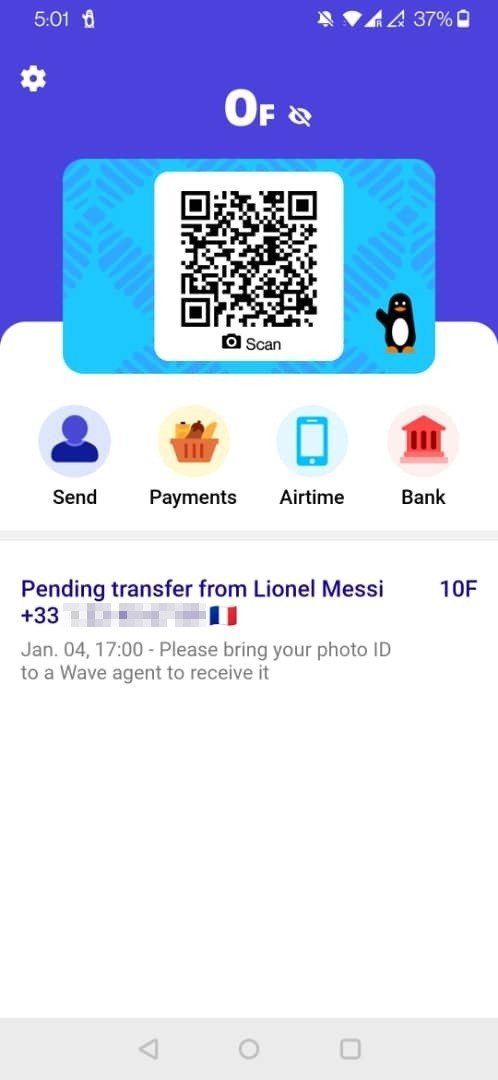
If the user completes the identification process, their account will be now KYC-2 and any subsequent remittance transfer will follow the KYC-2 user flow. If the user does not complete the identification within 15 days of reception, the remittance will be automatically reversed.
Non user flow
Non users don't have an active Wave account, but are still able to receive remittance transfers as long as they are able to receive sms messages.
Upon receiving a remittance these users will receive the following sms:
You received {AMOUNT} from {SENDER} in {COUNTRY}, bring the withdrawal code {CODE} and a photo ID to any Wave agent before {DEADLINE}. For directions to nearest agent, call {WAVE_SUPPORT_NUMBER}.
If the user completes the identification process, they will be able to withdraw the full amount or create a Wave account if they desire so. If the user does not complete the identification within 15 days of reception, the remittance will be automatically reversed.
Recipient identity verification
Wave does not perform any recipient identity verification before sending a remittance, only ensures that the user is properly identified before they have access to the funds.
To help ensure the recipient is the right person the sender is trying to reach, the Remittance API provides a name verification endpoint to compare the sender provided name with the information on Wave's side.
The comparison will be done against the legal name held by Wave by applying the following algorithms:
jaro_winkler: Just the plain jaro-winkler comparison.jaro_winkler_no_spaces: Same as jaro-winkler, but with both names concatenated.jaro_winkler_split_unsorted: The average jaro-winkler similarity score of each word in the name.jaro_winkler_split_sorted: The average jaro-winkler similarity score of each word in the name sorted.
Two names will be considered a match if the similarity score of any of the algorithms is over a 0.65 threshold.
If the user is not KYC-2, Wave does not have legal name information to compare against and the check will return NAME_NOT_KNOWN.
Name match
A name match is represented as a string that matches exactly one of the following values:
MATCH
There is a Wave recipient associated with the provided phone number and the provided name is similar to the recipient's name on their ID.NO_MATCH
There is a Wave recipient associated with the provided phone number but the provided name does not match that recipient's name on their ID.NAME_NOT_KNOWN
Either there isn't a Wave recipient associated with the provided phone number or the recipient with that mobile didn't submit an official ID to validate their name.
National ID match
Possible outcomes when verifying a recipient's national ID:
MATCH
The provided national ID exactly matches one of the recipient’s approved IDs on record with Wave.NO_MATCH
The provided ID does not match any of the recipient’s known IDs stored by Wave.ID_NOT_KNOWN
The recipient does not have any approved national ID on file with Wave.
Rate limiting
The name verification endpoint (/v1/user_name_matches/) is rate limited:
- Limit: up to 30 checks for the same phone number in any 5-minute window.
- Penalty: if you exceed this limit for the same phone number, that phone number will be blocked for 60 minutes for further name-checks.
Notes
- This rate limit applies only to the name verification endpoint and does not affect remittance or payout posting endpoints.
- The recipient-not-verified error is no longer raised and can be disregarded.
Base URL
All the endpoint paths referenced in the API document are relative to a base URL, https://api.wave.com.
Authentication
Authenticating to the API is done via API keys. These keys are bound to a single business wallet and can only interact with it.
If you need to interact with more than one wallet in your network, then you will have to obtain one key per wallet.
Each request must be sent over HTTPS and contain an authorization header specifying the bearer scheme with the api key:
Authorization: Bearer wave_sn_prod_YhUNb9d...i4bA6
Note that the actual key is much longer but for documentation purposes most of the characters have been replaced by an ellipses.
Obtaining your API key
You can manage API keys in the developer's section in the Wave Business Portal. You can create, view, and revoke keys, and define which specific APIs each key has access to.
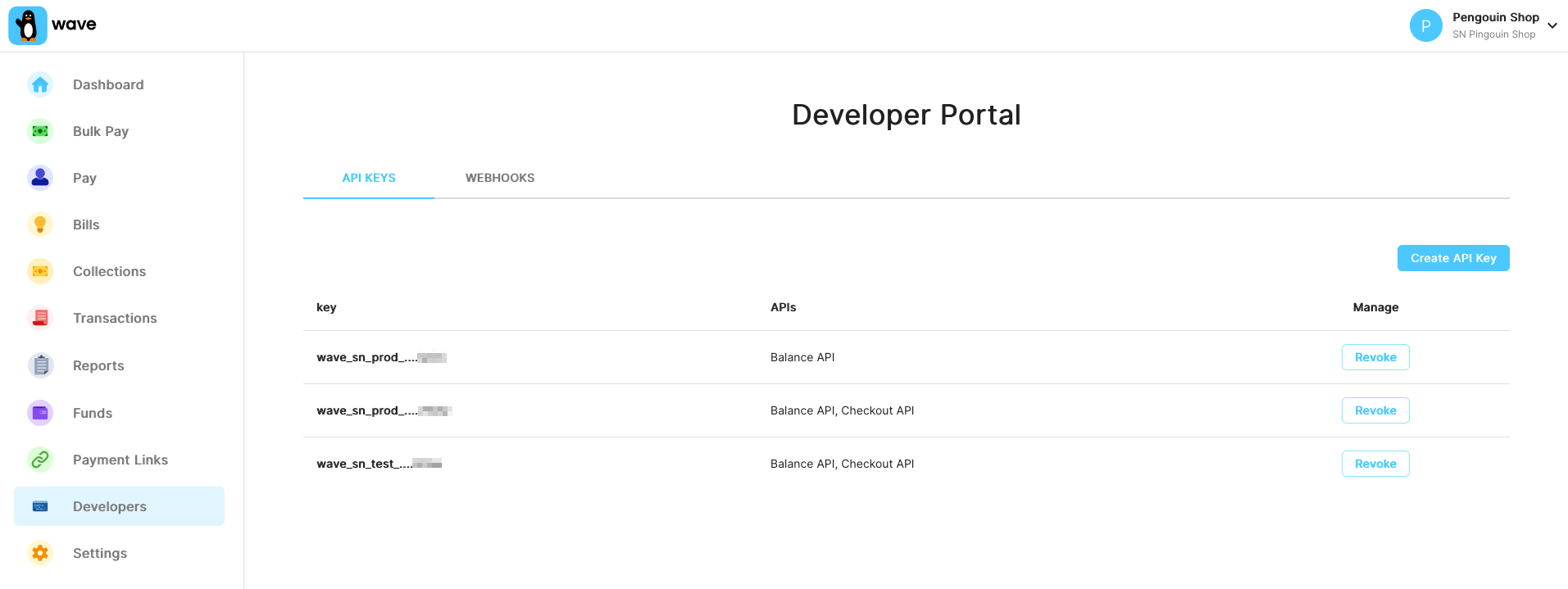
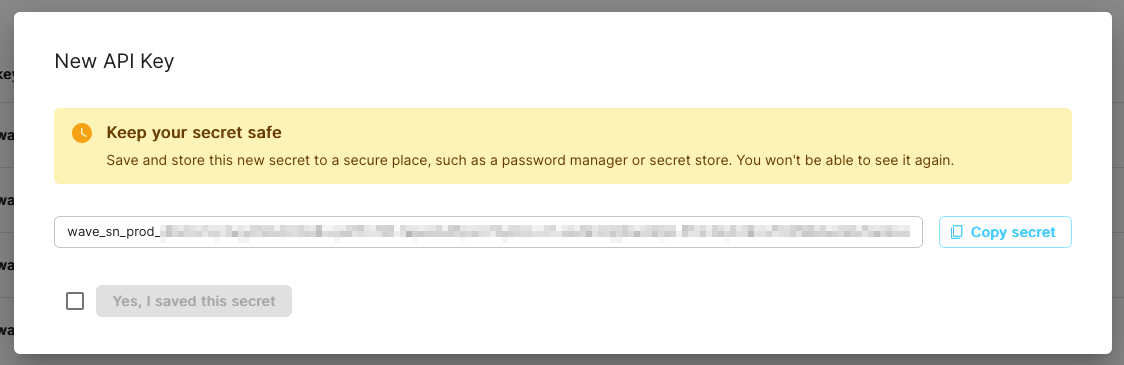
When you create a new API key, you will only see the full key once. Make sure you copy it without missing any characters, since it will be masked afterwards for security reasons.
Wave doesn't know your full key, but if you contact API support we can identify them by the last 4 letters that you see displayed in the business portal.
Request signing
Request signing allows you to prove the integrity of your API requests. When enabled, each request must include a Wave-Signature header containing a timestamp and an HMAC-SHA256 signature of the request body.
Request signing is optional. When you create an API key with request signing enabled, a signing secret is generated and shown to you once. After that, all requests made with that API key must include a valid Wave-Signature header.
Enabling request signing
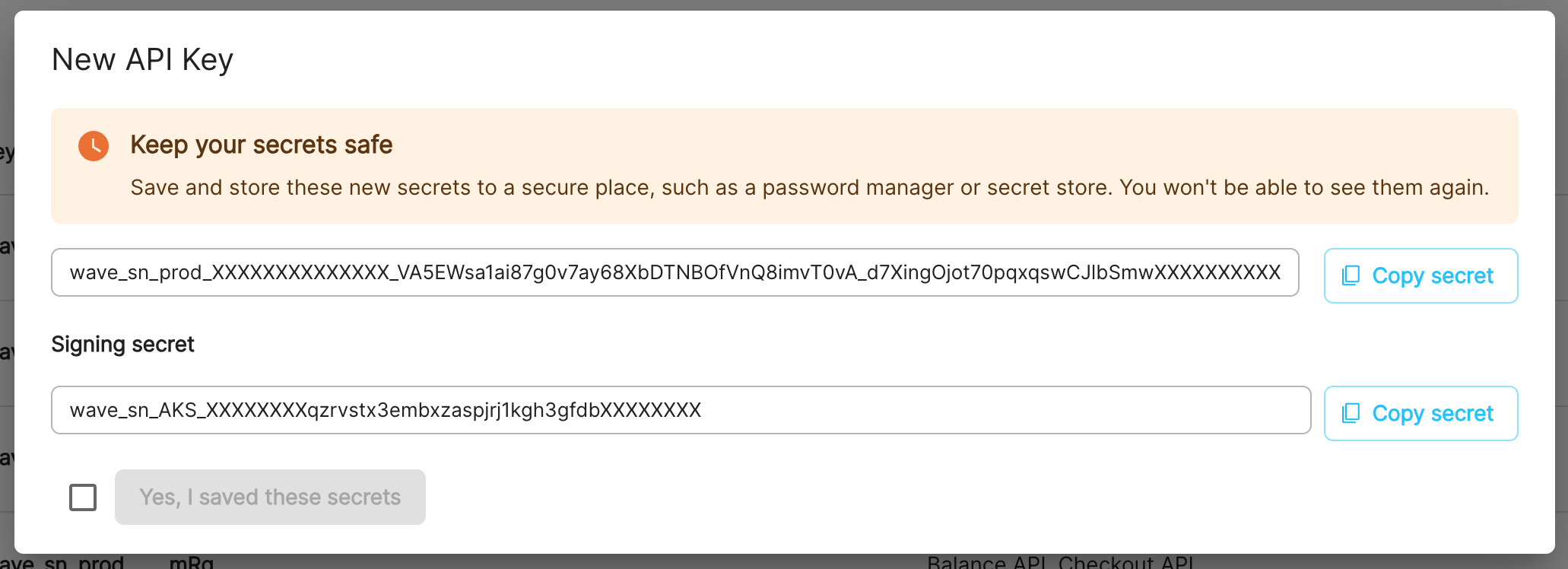
When creating a new API key in the Wave Business Portal, select the option to enable request signing. You will receive a signing secret in the format:
wave_sn_AKS_XXXXXXXXXXXXXXXXXXXXXXXXXXXXXXXXXXXXXXXX
Constructing the signature
To sign a request, you must:
- Get the current time as a Unix timestamp (integer seconds).
- Construct the payload by concatenating the timestamp with the raw request body (i.e.
timestamp + body). - Compute the HMAC-SHA256 of the payload using your signing secret as the key.
- Set the
Wave-Signatureheader tot={timestamp},v1={signature}.
Example
Wave-Signatureheader:
Wave-Signature: t=1639081943,v1=942119aedf9fa377844cf010785fe14ef8478c72af0b73d62ea3941335b526a8
The Wave-Signature header consists of a timestamp prefixed by t= and a signature prefixed by v1=, separated by a comma.
Signature generation examples
# Generate the signature and make a signed request
TIMESTAMP=$(date +%s)
BODY='{"amount": "1000", "currency": "XOF"}'
SIGNING_SECRET="wave_sn_AKS_XXXXXXXXXXXXXXXXXXXXXXXXXXXXXXXXXXXXXXXX"

SIGNATURE=$(printf '%s%s' "$TIMESTAMP" "$BODY" \
  | openssl dgst -sha256 -hmac "$SIGNING_SECRET" \
  | sed 's/^.* //')

curl -X POST \
  -H "Authorization: Bearer wave_sn_prod_YhUNb9d...i4bA6" \
  -H "Wave-Signature: t=${TIMESTAMP},v1=${SIGNATURE}" \
  -H "Content-Type: application/json" \
  -d "$BODY" \
  https://api.wave.com/v1/checkout/sessions
<?php
$api_key = "wave_sn_prod_YhUNb9d...i4bA6";
$signing_secret = "wave_sn_AKS_XXXXXXXXXXXXXXXXXXXXXXXXXXXXXXXXXXXXXXXX";

$body = json_encode([
    "amount" => "1000",
    "currency" => "XOF",
]);

$timestamp = time();
$signature = hash_hmac("sha256", $timestamp . $body, $signing_secret);
$wave_signature = "t={$timestamp},v1={$signature}";

$ch = curl_init();
curl_setopt($ch, CURLOPT_URL, "https://api.wave.com/v1/checkout/sessions");
curl_setopt($ch, CURLOPT_RETURNTRANSFER, 1);
curl_setopt($ch, CURLOPT_POST, 1);
curl_setopt($ch, CURLOPT_POSTFIELDS, $body);
curl_setopt($ch, CURLOPT_HTTPHEADER, [
    "Authorization: Bearer {$api_key}",
    "Wave-Signature: {$wave_signature}",
    "Content-Type: application/json",
]);

$result = curl_exec($ch);
curl_close($ch);
?>
const crypto = require('crypto');
const axios = require('axios');

const apiKey = "wave_sn_prod_YhUNb9d...i4bA6";
const signingSecret = "wave_sn_AKS_XXXXXXXXXXXXXXXXXXXXXXXXXXXXXXXXXXXXXXXX";

const body = JSON.stringify({
  amount: "1000",
  currency: "XOF",
});

const timestamp = Math.floor(Date.now() / 1000);
const payload = timestamp + body;
const signature = crypto.createHmac('sha256', signingSecret).update(payload).digest('hex');
const waveSignature = `t=${timestamp},v1=${signature}`;

axios.post("https://api.wave.com/v1/checkout/sessions", body, {
  headers: {
    "Authorization": `Bearer ${apiKey}`,
    "Wave-Signature": waveSignature,
    "Content-Type": "application/json",
  },
});
import java.nio.charset.StandardCharsets;
import javax.crypto.Mac;
import javax.crypto.spec.SecretKeySpec;

public class WaveRequestSigner {
    private static final byte[] HEX_ARRAY = "0123456789abcdef".getBytes(StandardCharsets.US_ASCII);

    public static String sign(String body, String signingSecret) throws Exception {
        long timestamp = System.currentTimeMillis() / 1000;
        String payload = timestamp + body;

        Mac sha256Hmac = Mac.getInstance("HmacSHA256");
        SecretKeySpec secretKey = new SecretKeySpec(
            signingSecret.getBytes(StandardCharsets.UTF_8), "HmacSHA256");
        sha256Hmac.init(secretKey);
        byte[] hash = sha256Hmac.doFinal(payload.getBytes(StandardCharsets.UTF_8));

        String signature = bytesToHex(hash);
        return "t=" + timestamp + ",v1=" + signature;
    }

    private static String bytesToHex(byte[] bytes) {
        byte[] hexChars = new byte[bytes.length * 2];
        for (int j = 0; j < bytes.length; j++) {
            int v = bytes[j] & 0xFF;
            hexChars[j * 2] = HEX_ARRAY[v >>> 4];
            hexChars[j * 2 + 1] = HEX_ARRAY[v & 0x0F];
        }
        return new String(hexChars, StandardCharsets.UTF_8);
    }
}
Timestamp validation
Wave validates that the signature timestamp is recent to prevent replay attacks. Requests are rejected if:
- The timestamp is more than 5 minutes in the past.
- The timestamp is more than 30 seconds in the future (to allow for minor clock skew).
Ensure your server's clock is reasonably synchronized.
Signed request for GET endpoints
For GET requests that have no body, use an empty string as the body when constructing the signature payload. That is, the payload is just the timestamp string.
Error codes
In the authentication phase, one of the following errors can cause your request to return early:
| Status | Code | Descriptions |
|---|---|---|
| 401 | missing-auth-header |
Your request should include an HTTP auth header. |
| 401 | invalid-auth |
Your HTTP auth header can't be processed. |
| 401 | api-key-not-provided |
Your request should include an API key. |
| 401 | no-matching-api-key |
The key you provided doesn't exist in our system. |
| 401 | api-key-revoked |
Your API key has been revoked. |
| 401 | missing-signature |
Your API key has request signing enabled but the Wave-Signature header is missing. |
| 401 | invalid-signature-format |
The Wave-Signature header is malformed. It must be in the format t={timestamp},v1={signature}. |
| 401 | invalid-signature |
The signature does not match. Verify you are using the correct signing secret and signing the raw request body. |
| 401 | invalid-signature-timestamp |
The timestamp in the signature is not a valid number. |
| 401 | expired-signature-timestamp |
The signature timestamp is too far from the current time. |
| 403 | invalid-wallet |
Your wallet can't be used in this particular API. |
| 403 | disabled-wallet |
Your wallet has been temporarily disabled. You should still be able to use the endpoint to check your balance. |
Leaked API key remediation
If you suspect or have confirmed that a Wave Business API key has been exposed — for example, committed to a public repository, accidentally shared, or otherwise compromised — this page describes how to rotate it and what Wave will do in response.
What's at risk
Wave Business API keys authenticate requests to the Business APIs. Anyone who obtains a leaked key can call any endpoint the key has permissions for, including initiating transfers up to the available balance. Treat any exposure as urgent and rotate the compromised key immediately.
Rotate
- Sign in to the Wave Business Portal.
- In the developer section, generate a new API key with the same roles as the leaked one.
- Deploy the new key to your integration.
- Once the new key is in use, revoke the old one from the Business Portal.
See Obtaining your API key for more details on creating and managing keys.
If you can't access the Business Portal or aren't sure which API key has been compromised, contact your Wave account manager and we'll help.
What Wave does
When we learn of a leak, an account manager reaches out to the partner who owns the key with the leak details and rotation instructions. If we believe the leak is being actively exploited or we can't reach the partner, Wave may revoke the key directly to contain the exposure.
Preventing future leaks
- Use environment variables or a secrets manager — never commit keys to source control.
- Enable request signing on your API keys, so a leaked key alone can't be used to make requests.
- Configure IP whitelisting on your API keys so even a leaked key can't be used from an attacker's network.
IP Whitelisting
IP whitelisting restricts API access to requests originating from specific, pre-approved IP addresses. Even if an API key is compromised, requests from unrecognized IPs are rejected; adding a second layer of defense on top of key-based authentication.
This helps meet financial-services compliance requirements and gives internal teams tighter control over which servers can reach Wave's APIs.
How It Works
IP whitelisting works alongside API key authentication. When a request hits the API, three checks happen in order:
- API key validation: Is the API key valid?
- Enforcement check: Is IP whitelisting enabled for this wallet?
- IP validation: Does the request's source IP match an entry in the whitelist?
All three must pass for the request to succeed.
Configuration
IP whitelisting is managed in the Wave Business Portal under the Developer section.
Supported Formats
You can whitelist a single IP or a CIDR range:
| Format | Example | Notes |
|---|---|---|
| Single IP | 203.0.113.45 |
Stored as /32 (IPv4) or /128 (IPv6) |
| CIDR range | 203.0.113.0/24 |
Whitelists an entire subnet |
Validation Rules
The system enforces the following constraints:
| Rule | Detail |
|---|---|
| Minimum prefix length | /8 for IPv4 (~16M addresses), /48 for IPv6 (standard site allocation) |
| No private/reserved IPs | Private, reserved, loopback and link-local addresses are rejected |
| No overlapping ranges | New entries must not overlap with existing whitelist entries |
| Normalization | All entries are normalized to strict CIDR notation |
Managing Entries
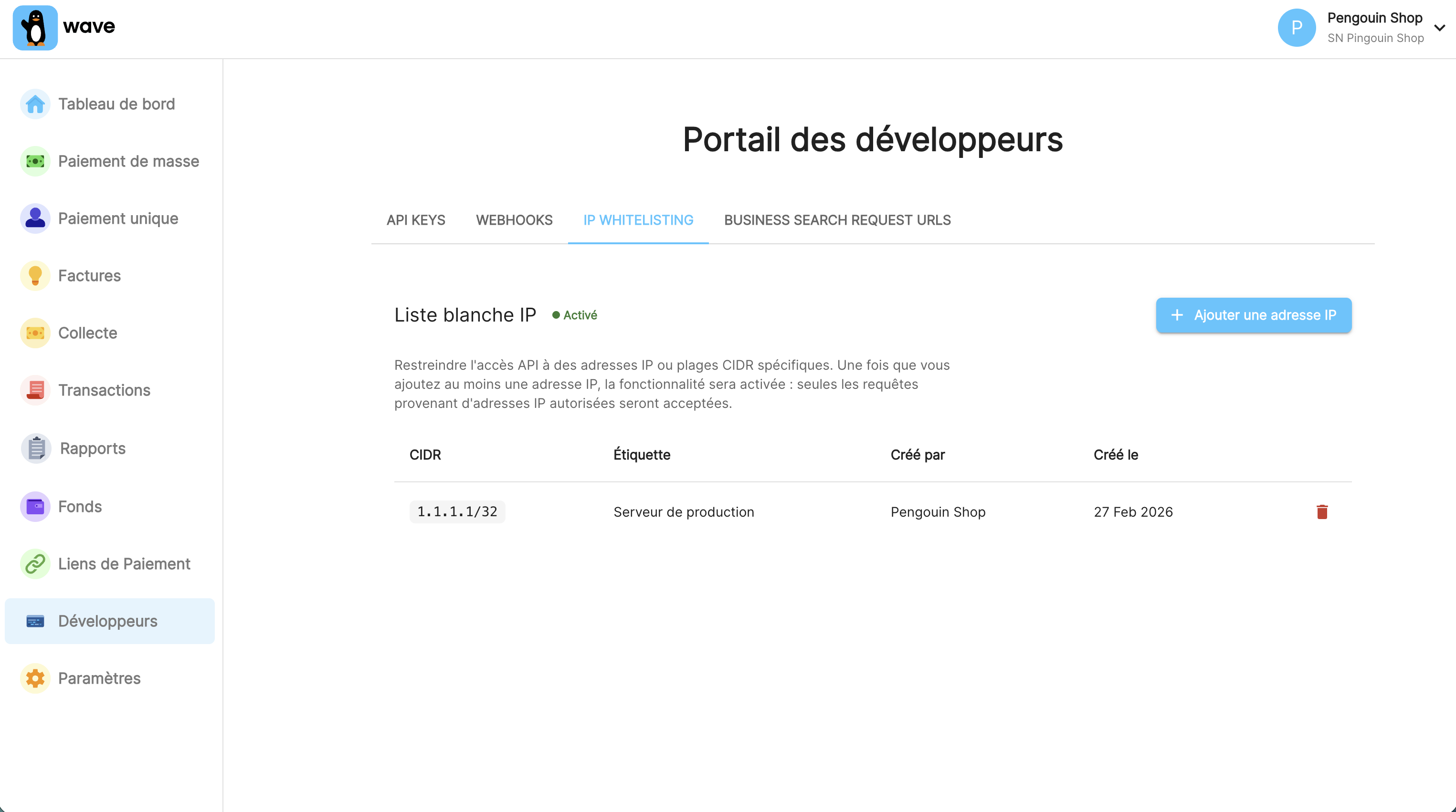
The portal lets you view all active whitelist entries, including labels and who created each one (created_by). Each entry should have a clear label describing the server, environment or purpose. This makes future audits much easier.
Error Handling
Requests from non-whitelisted IPs receive a 403 response:
| Status | Code | Description |
|---|---|---|
| 403 | ip-not-allowed |
The request originated from an IP address not on the allowlist |
{
  "error": {
    "code": "ip-not-allowed",
    "message": "Request from IP address (1.2.3.4) not in allowlist",
    "httpcode": 403
  }
}
Where possible, the IP address that the request originated from will be included in the error message. This can be used to check against the configured list of IP addresses in the portal.
Best Practices
Use static IPs. Dynamic IPs that rotate will break your integration. In cloud environments (AWS, GCP), use elastic or reserved IPs.
Keep ranges narrow. Whitelist only the specific IPs that need access. A single /32 per server is ideal; resort to broader ranges only when your infrastructure requires it.
Label everything. Include the server name, environment (staging/production) or purpose. Six months from now, an unlabelled entry is an entry nobody wants to touch.
Review regularly. Decommissioned servers and old test environments accumulate. Periodically audit the whitelist and remove stale entries.
Endpoints
Get balance
Returns the balance in your wallet.
Path
GET /v1/balance
Parameters
No parameters.
Request example:
curl \
  -X GET \
  -H 'Authorization: Bearer wave_sn_prod_YhUNb9d...i4bA6'
  https://api.wave.com/v1/balance
Result
A balance object consisting of a scalar and a currency code.
| Key | Type | Description |
|---|---|---|
| amount | Amount | Your wallet's balance in local currency. |
| currency | Currency code | ISO 4217 local currency code. |
Result example:
{
  "amount": "10245",
  "currency": "XOF"
}
Post remittance
Performs a money transfer from your wallet to a specific recipient within the same country.
Path
POST /v1/remittances
Parameters
| Parameter | Type | Description |
|---|---|---|
| sender_name | String | The sender's name, this will be displayed to the recipient. |
| sender_mobile | E.164 phone number (optional) | The sender's mobile, will be displayed to the recipient if given. |
| sender_country | Country code | The country from where this remittance was initiated. |
| recipient_name | String (optional) | The recipient name, might be kept for user verification. |
| recipient_mobile | E.164 phone number | The recipient mobile phone number. |
| amount | Amount | The receive amount. The amount must be rounded to the smallest meaningful denomination in use. For example, XOF amounts must be rounded to 5 and GMD amounts must be rounded to 1. |
| amount_currency | Currency code | The amount currency, must match the country's currency. |
| external_reference | External reference | Your own reference for this remittance, must be unique. |
| originating_mto | String (optional, min length: 2, max length: 40) | The name of the originating Money Transfer Operator, this will be displayed to the recipient in the transfer description. For example, if you set this to "SomeRemitter" the notification might contain a phrase similar to "You received 500F from Racky Remitter via SomeRemitter". |
Request example:
curl \
  -X POST \
  -H 'Authorization: Bearer wave_sn_prod_YhUNb9d...i4bA6'
  -H 'Content-Type: application/json' \
  -d '{
      "sender_name": "Racky Remitter",
      "sender_mobile": "+15417543010",
      "sender_country": "US",
      "recipient_name": "Ronald Recipient",
      "recipient_mobile": "+221701234001",
      "amount": "5000",
      "amount_currency": "XOF",
      "external_reference": "b23f7a05-13e4-4f5e-a394-fccc5cac9a6a"
    }' \
  https://api.wave.com/v1/remittances
Result
On success, it'll return the remittance ID, external reference and state.
| Key | Type | Description |
|---|---|---|
| remittance_id | String | Wave's transfer ID |
| external_reference | External reference | Your transaction reference. |
| state | Remittance state | Delivered to wallet, collected, etc. |
Result example:
{
  "remittance_id": "RT_P27JFG4AXA",
  "external_reference": "b23f7a05-13e4-4f5e-a394-fccc5cac9a6a",
  "state": "delivered_to_wallet"
}
Errors
If the remittance transfer can't be processed, the API response body will contain an error code and message detailing the reason.
The following is a list of all possible error codes returned by this endpoint:
| Status | Code | Description |
|---|---|---|
| 400 | request-not-json | Only JSON requests are currently supported. If you are sending JSON, check that the Content-Type header is set to application/json. |
| 400 | request-parsing-error | The request has an unsupported character encoding or data. Please send request bodies as valid UTF-8. |
| 400 | request-validation-error | The request contains some invalid parameters. Details will be included in the json body. |
| 422 | insufficient-funds | Your wallet doesn't have enough funds. |
| 422 | bad-currency | The currency doesn't match with the currency of the country you're attempting to send to. For example, the currency for Senegal must be XOF. |
| 422 | bad-country | The recipient mobile doesn't belong to the country you're attempting to send to. |
| 422 | bad-originating-country | The sender is from a country you are not allowed to send transfers from. |
| 422 | duplicate-external-reference | The external reference was already used by another transaction with different parameters. |
| 422 | amount-must-be-rounded | The amount must be rounded to the currency appropriate unit increment provided in the response message. For example, XOF amounts must be rounded to 5 and GMD amounts must be rounded to 1. |
| 422 | recipient-blocked | The transfer can't be performed because the recipient is blocked. You should ask the recipient to get in touch with Wave support to know more details about this block. |
| 422 | exceeds-limit | The recipient has reached their account limits and the transaction can't be performed. |
| 503 | unknown-error | Wave may be having an outage, contact us immediately. |
On validation error
If there is a validation error, such as a very long originating MTO, a malformed mobile number, an invalid country code, etc., the transaction won't be performed and we'll respond with HTTP status code 400 and details about the validation errors in the body.
Error example:
{
    "code": "request-validation-error",
    "message": "Request invalid",
    "details": [
        {
            "loc": [
                "sender_country"
            ],
            "msg": "Unknown country identifier: UF",
            "type": "value_error"
        }
    ]
}
On processing error
If the request is valid but there's some other error in the process of performing the transaction we'll respond with HTTP status code 422 and details about what went wrong.
Error example:
{
    "code": "insufficient-funds",
    "message": "Your wallet doesn't have enough funds."
}
On duplicate external reference
When a duplicate reference is used, if the parameters match a previously
successful transaction we'll just return the successful response again, no error.
If the parameters are different we'll return an error of
duplicate-external-reference.
Error example:
{
    "code": "duplicate-external-reference",
    "message": "The external reference was used to perform another transaction with different fields (differing fields: recipient_mobile)."
}
For failed requests, the external reference isn't kept so if your request fails you could use the same external reference to try again. In this case we won't check that the parameters match the ones from the previous request.
Retrying transactions
The following are Wave's recommendations on retry logic.
Some errors are unexpected, which means the transaction is in an unknown state. This can for example happen during an outage or when there are internet connectivity issues.
- It is important that you mark your transactions internally as being pending.
- You should then retry those transactions using the same external_reference. There is no time limit for retrying.
- Use retries that start at 1-second intervals and then use exponential backoff.
- If you have a remittance ID or an
external_reference, then you can also fetch the remittance to inspect its state
Reverse a remittance
POST /v1/remittances/reversal
curl -X POST \
  --url https://api.wave.com/v1/remittances/reversal \
  -H 'Authorization: Bearer wave_sn_prod_YhUNb9d...i4bA6' \
  -H 'Content-Type: application/json' \
  -d '{
        "external_reference": "b23f7a05-13e4-4f5e-a394-fccc5cac9a6a",
        "reversal_reason": "WRONG_AMOUNT"
     }'
Example response
200 OK

{
  "remittance_id": "T_9F232MAXL8",
  "external_reference": "b23f7a05-13e4-4f5e-a394-fccc5cac9a6a",
  "state": "refunded"
}
Reverses a previously executed remittance transfer.
Please only invoke this endpoint when necessary, since each reversal is a potentially confusing experience for our users.
Currently there is an exact 7-day limit for reversing remittance transfers, counting from the time they were created.
This endpoint is idempotent, such that if you try to reverse an already reversed remittance transfer, then you will get a success return code, but no additional transaction will be created. You can therefore never reverse a remittance transfer twice by accident.
Request body
The request body has the following shape:
| Key | Type | Description |
|---|---|---|
external_reference |
External reference | Your transaction reference. |
reversal_reason |
String. One of WRONG_AMOUNT, WRONG_RECIPIENT (required) |
The reason for performing the reversal. |
Response body
If the reversal succeeds, this endpoint returns a 200 HTTP code, and a JSON body containing the remittance ID, external reference and state.
| Key | Type | Description |
|---|---|---|
| remittance_id | String | Wave's transfer ID. |
| external_reference | External reference | Your transaction reference. |
| state | Remittance state | Delivered to wallet, pending collection, etc. |
Errors
If the reversal fails, an HTTP code above 400 is returned, along with an error type:
request-validation-error
The request contains some invalid parameters.not-found
No remittance transfer with that external reference was found under the wallet linked to your API key.insufficient-funds
The recipient wallet doesn't have enough balance to cover the reversal.remittance-reversal-time-limit-exceeded
The time window for reversing a remittance transfer has passed. Currently seven days.unknown-error
This is most likely be a bug in our code, and it should be reported.
Get remittance state
Indicates the current state of a given remittance.
Path
GET /v1/remittances/:external_reference
Parameters
| Parameter | Type | Description |
|---|---|---|
| external_reference | External reference | Your transaction reference, originally used to perform the remittance. |
Request example:
curl </span>
  -X GET </span>
  -H 'Authorization: Bearer wave_sn_prod_YhUNb9d...i4bA6'
  https://api.wave.com/v1/remittances/b23f7a05-13e4-4f5e-a394-fccc5cac9a6a
Result
On success, it'll return the remittance ID, external reference and state.
| Key | Type | Description |
|---|---|---|
| remittance_id | String | Wave's transfer ID |
| external_reference | External reference | Your transaction reference. |
| state | Remittance state | Delivered to wallet, pending collection, etc. |
| receive_amount | String | Amount received by the recipient. |
| sender_name | String | Sender's name. |
| sender_mobile | String | Sender's mobile number. |
| sender_country | String | Sender's country code. |
| recipient_mobile | String | Recipient's mobile number. |
| when_created | String | Date and time the remittance was created. |
Result example:
{
  "remittance_id": "T_9F232MAXL8",
  "external_reference": "b23f7a05-13e4-4f5e-a394-fccc5cac9a6a",
  "state": "collected"
  "receive_amount": "1000.00",
  "sender_name": "John Doe",
  "sender_mobile": "+1234567890",
  "sender_country": "fr",
  "recipient_mobile": "+0987654321",
  "when_created": "2024-08-12T10:00:00Z"
}
Errors
| Status | Code | Description |
|---|---|---|
| 400 | request-validation-error | For this particular case, this error means the external reference provided has the wrong format. |
| 404 | not-found | A successful remittance with the given external reference can not be found. Note that a failed remittance will always return this response. |
Verify name match
Verify whether the name parameter matches the official name of the recipient identified by the mobile number. More details about this process can be found here.
Path
GET /v1/user_name_matches/:mobile/:name
Parameters
| Parameter | Type | Description |
|---|---|---|
| mobile | E.164 phone number | The recipient mobile phone number. E.164 phone numbers usually starts with a '+' sign, but it's optional since some frameworks have trouble adding the sign to urls. |
| name | String | The recipient name. |
Request example:
curl </span>
  -X GET </span>
  -H 'Authorization: Bearer wave_sn_prod_YhUNb9d...i4bA6'
  https://api.wave.com/v1/user_name_matches/221555000555/John%20Doe
Result
On success, the endpoint returns the result of our name verification process.
| Key | Type | Description |
|---|---|---|
| match | Name match | Whether the name parameter matches the user name |
Result example:
{
  "match": "NO_MATCH"
}
Errors
This endpoint has a stricter rate limit to protect our users identity. The rate limiting is counted by mobile number, so checking the name for a mobile number does not influence rate limiting for a different mobile number.
| Status | Code | Description |
|---|---|---|
| 400 | request-validation-error | For this particular case, this error means the external reference provided has the wrong format. |
| 400 | rate-limit-error | Rate limit exceeded, try later. |
Object types
Common types
| Type | Example | Description |
|---|---|---|
| Amount | "500" | All amounts are represented as a string. When the amount includes decimal places, the separator is a period (.). |
| Boolean | true | Possible values: true or false. |
| Integer | 450 | A whole number, it should only contain digit characters. |
| Currency code | XOF | Standard ISO 4217 three-letter codes in upper case are used to specify currency. |
| Country code | sn | Standard ISO 3166-1 alpha-2 two-letter code identifying a country. |
| E.164 phone number | +221761110000 | Phone numbers follow the E.164 standard. They include a country code preceeded by +. |
API specific types
External reference
This is just a regular string, but it needs to fulfill some requirements:
- Minimum length of 6 characters.
- Maximum length of 36 chaacters.
- Only some characters are valid: alphanumeric characters, underscore (
_) and dash (-).
UUIDs are valid external references.
Name match
A name match is represented as a string that matches exactly one of the following values:
MATCH
There is a Wave recipient associated with the provided phone number and the provided name is similar to the recipient's name on their idNO_MATCH
There is a Wave recipient associated with the provided phone number but the provided name does not match that recipient's name on their idNAME_NOT_KNOWN
Either there isn't a Wave recipient associated with the provided phone number or the recipient with that mobile didn't submit an official ID to validate their name.
Remittance state
A remittance state is represented as a string that matches exactly one of the following values:
delivered_to_user
The recipient is a Wave user and the funds were delivered to the associated wallet.pending_recipient_verification
The recipient must go to an agent for ID verification in order to receive their funds.pending_collection
The funds for the recipient are available to be collected in cash at an agent.collected
The funds were collected at an agent.refunded
The transaction was reversed.
This state will always transition to one of the following states after a period
of time: (delivered_to_user, collected, pending_collection or refunded).
Remittance lifecycle
Overview
To better understand what the remittance states mean, it makes sense conceptually to summarise the lifecycle of a remittance in 3 steps:
- Validation step. Some remittances actually die here, these are not created remittances, just failed attempts.
- Money moved (or held) step. This is the last step for the majority of remittances.
- In some cases, refunded.
Detailed breakdown
The following diagram shows the different transaction status you will get from the API during the remittance lifecycle.
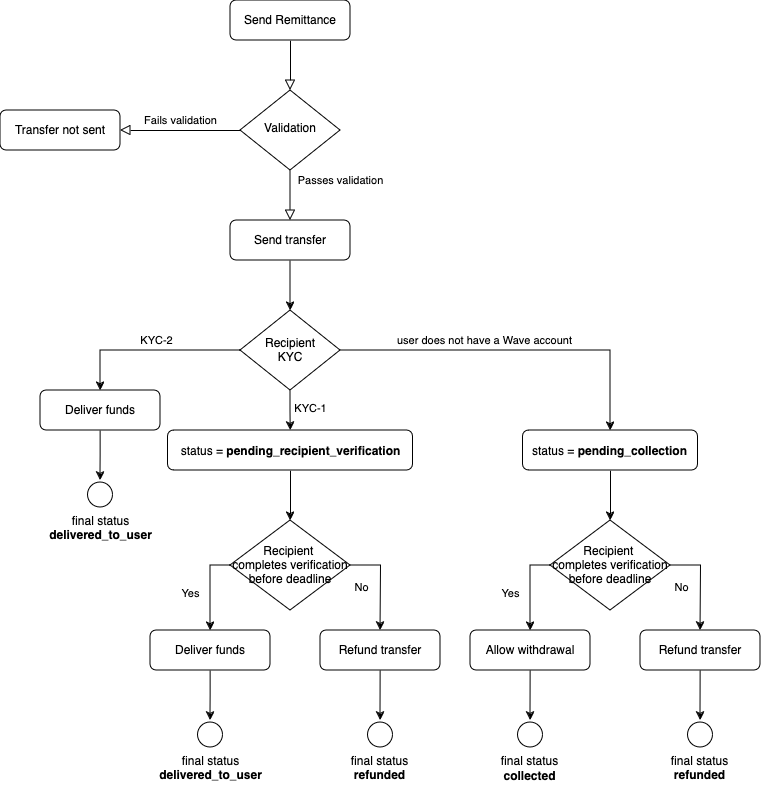
For more details about how each step looks from the user perspective, refer to the Customer Flow section.
Sandbox Testing Environment
The sandbox testing environment works exactly the same as our prod environment and can be found through the same endpoints, by accessing it with API keys related to your test account.
In this environment you will be able to send remittances to test phone numbers associated with the different possible flows and some errors of the API.
Test cases
- User limits exceeded: Always returns error
exceeds-limit - User blocked: Always returns error
recipient-blocked - KYC-2 flow:
- Transaction will succeed and be delivered automatically as is the case for KYC-2 users, returning status
delivered_to_user - The transaction will be refunded within 5-10 minutes, changing its status to
refunded
- Transaction will succeed and be delivered automatically as is the case for KYC-2 users, returning status
- KYC-1 flow:
- Transaction will succeed and be pending recipient verification as is the case for KYC-1 users, returning status
pending_recipient_verification - The transaction will be delivered to the user within 5-10 minutes, changing its status to
delivered_to_user - The transaction will be refunded within 10-15 minutes, changing its status to
refunded
- Transaction will succeed and be pending recipient verification as is the case for KYC-1 users, returning status
Changelog
2024-08-07
- Added Sandbox Testing
2022-11-29
- Added new documentation on endpoints related to name verification for specific partners.
2022-11-21
- Edited the verify name match endpoint documentation for clarity.
- Added hyperlinks to object types in endpoints.
2022-10-13
- Removed outdated documentation outlining recipient verification
2022-08-24
- Removed the
FAILEDremittance state, attempts to create a remittance will either succeed and get a successful remittance state or fail synchronously. - Added remittance lifecycle section.
- Removed documentation for deprecated recipient verification in "POST /v1/remittances".
2022-08-05
- Added support for a new remittance state:
pending_recipient_verification.
2022-08-02
- Added
bad-originating-countryerror code.
2022-07-26
- Added a new endpoint to verify if user name matches.
- Deprecated recipient verification parameters from post remittance endpoint.
2022-07-13
- Adjusted the Get remittance state endpoint: if the remittance POST request results in a failure (ie returns status
422: Unprocessable Entity), a GET request for the provided external-reference will return 404 and can be safely retried.
2022-07-05
- Added some missing error codes:
recipient-blocked,invalid-wallet,disabled-wallet,missing-auth-header,invalid-auth,api-key-not-provided,no-matching-api-key&api-key-revoked.
2022-05-16
- Removed
pendingstate, we'll either fail or succeed synchronously.
2022-04-26
- Increased max length for "originating_mto" param from 16 to 40.
2022-04-06
- Activated functionality for the "recipient_verification_require_verified_id" parameter
- Renamed "recipient_verification_match_threshold" to "recipient_verification_require_name_match" and changed its type from an optional integer to an optional boolean
- Activated functionality for the "recipient_verification_require_name_match" parameter
- Added the
recipient-not-verifiedandrecipient-name-mismatcherror codes
2022-03-25
- Added an optional "originating_mto" param for "POST /v1/remittances".
2022-03-09
- Added two new object types: boolean and integer.
- Updated "POST /v1/remittances" endpoint to support recipient name verification.
- Fixed: "GET /v1/remittances" actually returns
not-foundrather thanremittance-not-found. - Fixed: Broken reference to the get user name endpoint which no longer exists.
2022-02-25
- Added
bad-countryerror code. - Renamed
delivered_to_wallettodelivered_to_user. - Added
pendingstate. - Add
duplicate-external-referenceerror in "POST /v1/remittances". - Remove the expectation that failed or pending remittances can be retried (might be added in the future).
- Removed "GET /v1/user_names" endpoint.
2022-02-17
- Require country code param in "POST /v1/remittances".
2022-02-16
- Renamed idempotency key to external reference.
- Sender mobile param in "POST /v1/remittances" is now optional.
2022-02-11
- Updated authentication method to use auth bearer instead of HTTP basic auth.
- Make the
+prefix in E.164 phone numbers optional when used in the path component of a URL.
2022-02-09
- Improved endpoint naming consistency:
- Renamed "GET /v1/transfer_state" endpoint to "GET /v1/remittances".
- Renamed "POST /v1/remittance" endpoint ot "POST /v1/remittances".
- Generally, renamed transfers to remittances.
- Updated remittance states.
2022-02-03
- Initial release.